Business Intelligence Tiles Overview
Last updated: June 15, 2026
What are the Business Intelligence Tiles?
<CP Name>'s Business Intelligence tiles give you an easily digestible overview of your business's key performance indicators. Each tile surfaces a different area of your financial picture as soon as your data is connected. The tiles update in real time, so the numbers always reflect the latest data as new transactions come in.
What does the Profit & Loss tile show?
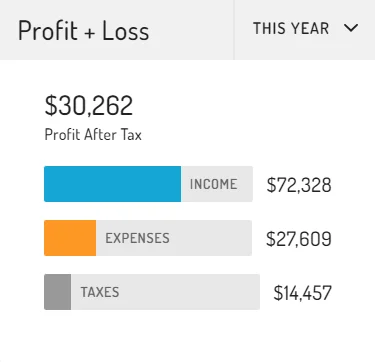
The Profit & Loss tile shows you a snapshot of your business's profit after tax. Unlike a standard P&L, this tile subtracts your estimated tax obligation from the final number, so the figure reflects what you actually keep.
What does the Cash Flow tile show?
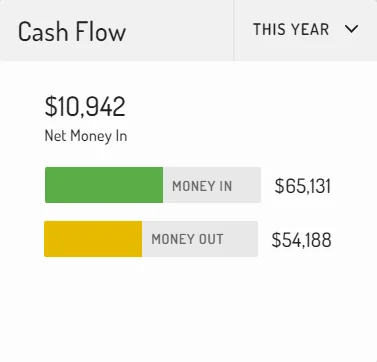
The Cash Flow tile shows you the money moving in and out of your connected bank accounts. It captures all transaction types: income, expenses, bank transfers, loans, owner's draw, tax payments, etc.
What does the Invoices tile show?
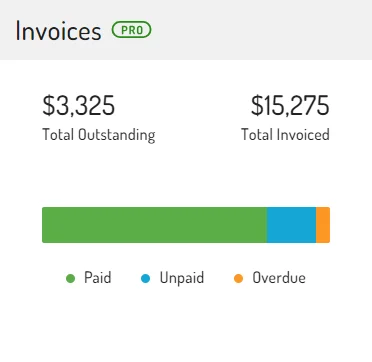
The Invoice tile shows you a summary of the invoices you've sent, including the total amount still outstanding across all open invoices.
What does the Expenses tile show?
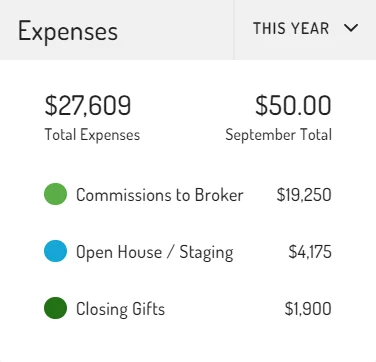
The Expense tile shows you a breakdown of your business expenses by category. It reflects actual operating expenses only, excluding capital assets, owner's draw, and any other spending that adds to your balance sheet, rather than counting as a business cost.
What does the Income tile show?
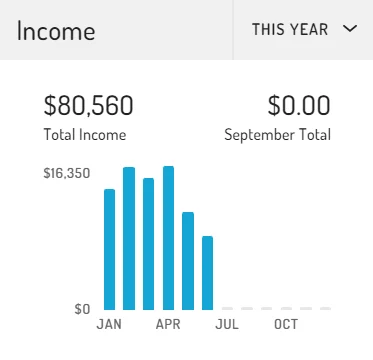
The Income tile shows you your business income totals across each month. It excludes bank transfers, loans received, and anything else that adds to your balance sheet rather than reflecting earned revenue.
What does the Taxes tile show?
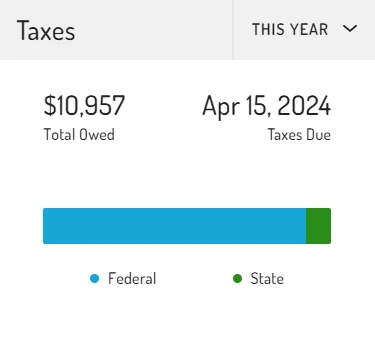
The Tax tile shows you an estimate of what you owe in federal, state, and self-employment taxes. <CP Name> calculates this automatically for all pass-through entity types.